⬇️ Install the latest version here
npm install @savoirfairelinux/jami-web
📰️ What's New (and Improved)
Jami's web client has gotten a lot of love since its last preview. You might be thinking, "It looks the same...", but we're here to reiterate the famous quote, "It's not what's on the outside that matters, it's what's on the inside."
A significant number of core features and improvements to the user experience have been added. We would shove them all in a list here, but you know what they say: a picture's worth a thousand words, so let's take a look together.
✍️ Better Message Composition
The message composer might look the same to most of you, but we promise you'll find it changed a lot once you start to play around with it. Let's break down what's changed.

😀️ Colon Notation Emojis
You can now type emojis at rapid speed! Start by typing a colon (:) and the first two letters of the emoji you want to find. A handy keyboard-navigable list will appear with suggestions for the emoji you're looking for. No more digging through the emoji picker for the 🫘 (beans) emoji!
⌨️ Formatting Shortcuts
Emphasizing your messages has been simplified! You can enable or set a style for a selected piece of text with shortcuts. Should you forget any of them, you can simply hover over the specified style to reveal its shortcut.
👁️️ Markdown Preview
You may want to know how your formatted message may look before you send it off, so we added an eye-con (ba-dum-tss 🥁) to preview your message in Markdown format.
✏️ Rapid Message Editing
We all make mistakes, especially when writing messages. Instead of hovering over your message and clicking the "Edit message" button, you can press the up arrow key ⬆️ to edit the last message that you sent.
💬️Alternative Messaging
Sometimes words aren't enough, and maybe you want to make sure your recipient understood what you meant, either by tone or facial expression.
🎙️Voice Messages
Hear me out: you just heard the hottest gossip at the table next to you in the coffee shop, but it was way too complicated to be able to spill over text to your friend. Introducing voice messages!
📹️ Video Messages
Sometimes mom wants you to send grandma a video message for the holidays instead of a simple text. The video message function is useful for just that kind of thing! If you mess up (or maybe your hair just didn't look right that one take), then you can click the restart icon ⟲.
📈 Chat Improvements
📜 Message Edition History
If you've ever wanted to inspect how many times your friends decided to change their minda about plans, now you can! To see the edits someone made to their message, hover over the message and select View message editions.
🗯️Message Reactions
Similar to the message edition history, you can see all the reactions for messages (as well as who reacted to them) by selecting View reactions.
🔗️ Link Previews
Sending links in your chats will now render a preview of the content of the link; you no longer need to open a link just to see something as simple as a comic!
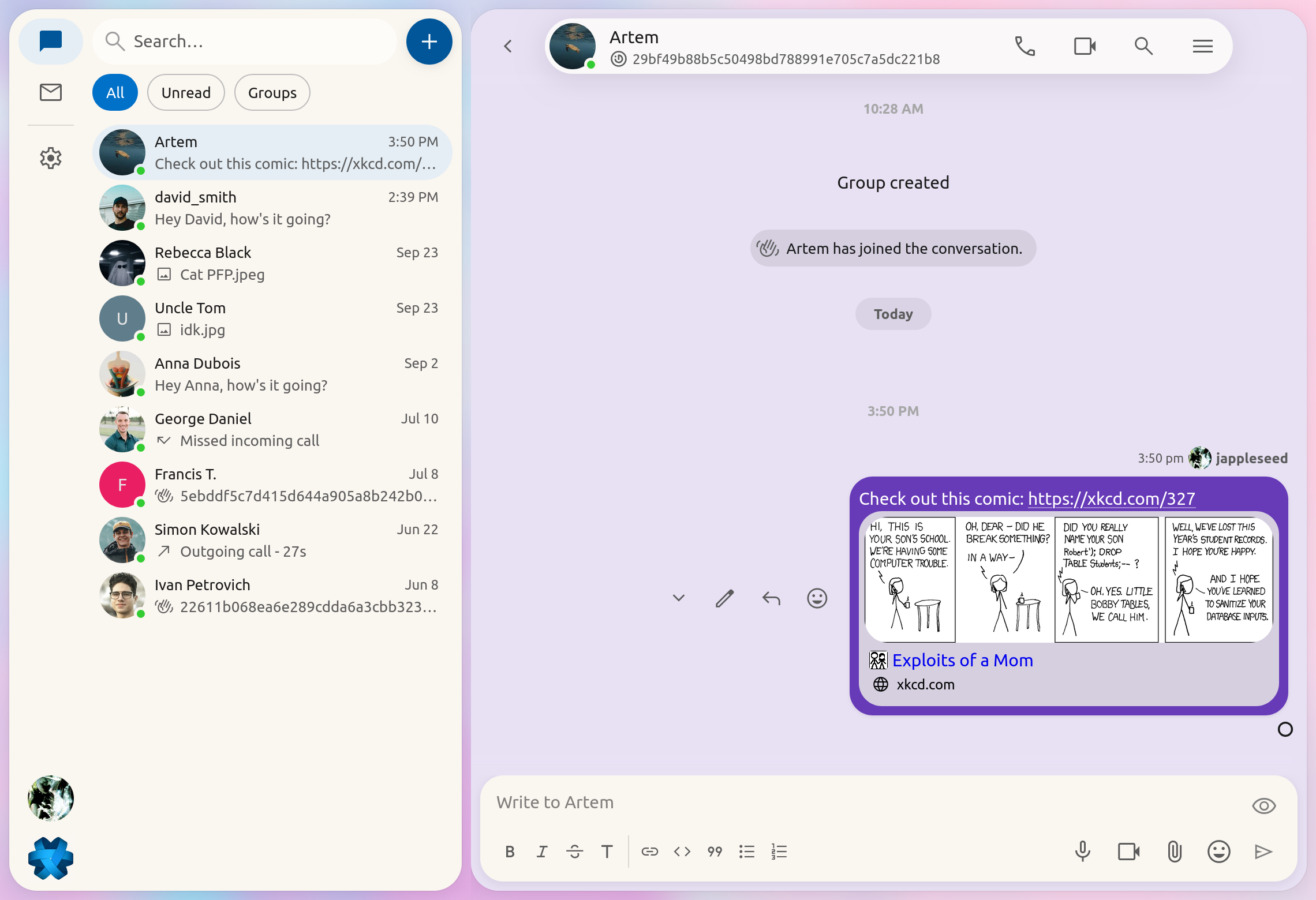
A: The Jami team respects your tastes, which is why you can disable this feature in the following setting ⚙️ General -> Chat -> Web Link Previews
🖱️Smoother Scrolling
We've made a great effort to improve the scrolling experience. New messages should now load seamlessly without shifting your viewpane!
👥 Groups
Good news! Groups are now available in this preview of Jami web!
➕ Group Creation
Creating groups is now a two-step process. To start creating a group, press the big blue plus ➕ button next to the search bar. You will be prompted to select which people and groups (yes, groups) you want to invite to the group.
A: Not to worry, we handle this in the background. Your contact will not be invited twice 😉!
Once done, you can set a picture, name and the details for the group. You are not obligated to set any of these if you want to retain some privacy!
📨 Member Invitation
Maybe you want to add someone to the group, or maybe you have a new friend who you want to invite. Not to worry, there's a handy add member function in the details pane that will help you with that!
💼 Member Management
Sometimes people misbehave and need to be dealt with ... accordingly. You can manage your members easily in the details panel mentioned previously. Simply right-click a member to perform an action on them (such as banning or kicking).
🔌️ Connection Notifications
If you ever lose connection to the Jami web server, you'll no longer be left in the dark. A notification will now appear to let you know that you've lost that connection. You'll be notified once it re-establishes as well!
Ready to Try Jami-Web?
Have an issue with Jami-Web?
Our donation campaign
Building Jami is not only about writing code. It also means funding engineering time, testing, support, packaging, and the ability to keep the project independent.
If Jami is useful to you, whether every day or as a reliable alternative when you need it, your donation directly helps maintain this level of quality and accelerate development, without compromising the project’s founding principles.
 Donate to Jami
Article by: Ilyas Erdogan (Jami Team)
Feature Image: Self Portrait In A Glass Ball, 1918 by Christian Krohg


